.jpg)
CISC 440/640
Interactive 3D Graphics
Spring 2015






LECTURE NOTES -
- (02/09) Lecture 1: Introduction – Course Overview and Organization (pdf)
- (02/11) Lecture 2: Graphics Interface and GLUT(pdf)
- (02/16, 02/18) Lecture 3 & 4: World and Screen Spaces (pdf) H&B Chapter 6
- (02/23) Lecture 5: 2D Transformation (pdf) H&B Chapter 5-1 to 5-8
- (02/25) Lecture 6: 3D Transformation I (pdf) H&B Chapter 5-9 to 5-18
- (03/02) Lecture 7: Line Drawing (pdf) H&B Chapter 3-5
- (03/04) Lecture 8: Building Up the 3D World (pdf)
- (03/09, 03/11) Lecture 9 & 10: 3D Transformation, Projection, Viewing Transform(pdf)
- (03/19) Lecture 11 & 12: Clipping, Culling, and Visibility(pdf), here is the bsp demo
- (03/23) Lecture 13: Scan Converting Triangles (pdf)
- (04/06, 04/13) Lecture 15 & 16: Illumination and Shading(pdf) H&B Chapter 10-1 to 10-3
- (04/15, 04/20) Lecture 17 & 18: Ray Tracing I & II H&B Chapter 10-11
- (04/22, 04/27, 04/29) Lecture 19, 20, 21: Texture Mapping (pdf) H&B Chapter 10-17, Redbook Chapter 9
- (05/04, 05/06) Lecture 22 - 23: GPU (pdf)
PROJECTS -
02/18/15 Part 1: Due 02/27/15
Part 2: Due 03/06/15
Image Manipulation in OpenGL 03/11/15 Due 03/27/15
Virtual Trackball and Polygon Selection 04/15/15 05/06/15 Ray Tracing (skeleton code can be found here. More info on ray tracing can be found here and here.) 05/06/15 05/20/15 GPU Programming
EXERCISES -
SAMPLE CODE --
Date Handout Lecture 1 OpenGL_simple.cpp Lecture 3 ImageViewer.zip Lecture 7 Here I provide the C code for computing the projective transformation.
Lecture 10
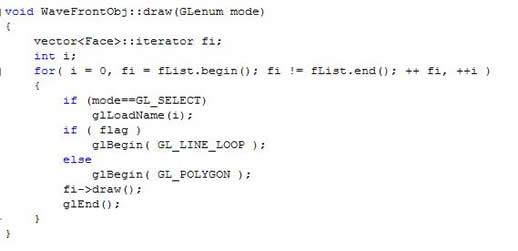
For more information on how to pick a specific polygon from the cursor, check out the following tutorial and pdf document
It is important that after you change the render mode to be GL_SELECT and specify the select window size by glupickmatrix, you need to load the polygon name before rendering it, i.e, you code should look like